Top Benefits of Using Blender for Interactive Design Prototypes
In today’s fast-paced digital world, interactive design is no longer a luxury—it’s an expectation. Brands, developers, and designers want prototypes that feel real, function smoothly, and showcase the final experience before development even begins. This is where Blender, one of the most powerful open-source 3D tools, stands out as a game-changer.
Whether you’re creating product demos, architectural walkthroughs, UI/UX animations, AR/VR previews, or full interactive simulations, Blender gives you unmatched creative freedom. Let’s explore the biggest benefits of using Blender for interactive design prototypes.
1. Realistic Visualizations for Stronger Project Impact
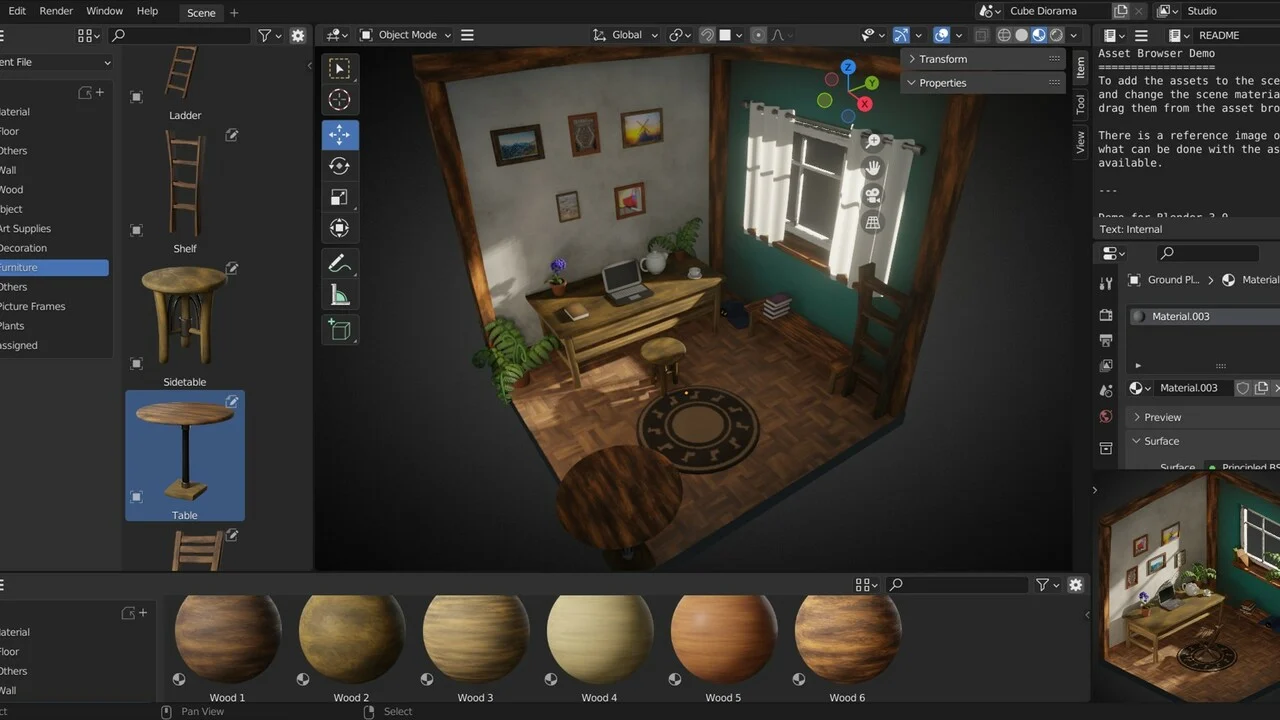
Blender allows designers to create highly realistic 3D models, environments, and animations. With advanced lighting, textures, and rendering options, your prototype looks more like the final product—boosting clarity and user understanding.
Why it matters:
- Clients can visualize the final experience
- Stakeholders understand the design instantly
- Reduces guesswork and improves decision-making
2. Fully Interactive Motion and Experience Design
Traditional 2D prototypes can feel flat. Blender brings motion and interactivity to life with tools like:
- Keyframe animation
- Physics simulations
- Rigging
- Camera animations
This makes your user flows, transitions, and interactions more dynamic and realistic.
Perfect for:
✔ UI microinteractions
✔ Product animations
✔ User journey storytelling
✔ AR/VR prototype previews
3. Ideal for VR and AR Prototyping
With built-in support for VR scene inspection and compatible workflows for AR environments, Blender makes immersive design prototyping easier than ever.
Benefits:
- Create 1:1 scale environments
- Test spatial design
- Preview interaction in virtual space
- Export assets for game engines like Unity and Unreal
4. A Cost-Effective, Open-Source Solution
One of the biggest advantages of Blender is that it’s completely free—no licensing fees, no subscription costs.
What this means for designers and studios:
- Zero software investment
- Access to professional tools
- Ability to scale without cost barriers
5. Powerful Real-Time Rendering with Eevee
Blender’s Eevee render engine provides real-time rendering, allowing you to view and adjust your design instantly. This speeds up the prototyping process and helps you iterate faster.
Key advantages of Eevee:
- Immediate visual feedback
- High-quality lighting and shaders
- Great for animations and mockups
- Faster client approvals
6. Endless Creative Flexibility
Blender supports modeling, sculpting, animation, video editing, simulations, and even scripting. This gives designers the flexibility to build prototypes exactly the way they imagine.
You can design:
- Realistic product demos
- Immersive environments
- UI animations with depth
- Motion graphics
- Interactive mockups
7. Smooth Integration With Other Tools
Blender exports cleanly to a variety of formats used in interactive design pipelines:
- FBX, OBJ, GLTF for game engines
- SVG, PNG, JPG for 2D assets
- MP4, MOV for video prototypes
- USD for pipeline workflows
It fits seamlessly into workflows involving:
- Figma
- Unity
- Unreal Engine
- After Effects
- WebGL
8. A Strong Community & Endless Resources
Blender has one of the world’s largest creative communities. Designers can access:
- Tutorials
- Add-ons
- Free and paid assets
- Forums and support groups
This makes learning faster and troubleshooting easier.
Conclusion: Why Blender is the Future of Interactive Prototyping
Blender is more than a 3D tool—it’s a complete interactive design ecosystem. Its combination of realism, flexibility, interactivity, and cost efficiency makes it perfect for modern design workflows.